
A useful campaign has one audience, one clear offer, and one next step. Use this guide to keep a campaign useful over time: plan, publish, answer questions, review results, and repeat. There is no seven-day expiry. The optional weekly example below is a starting template, not an end date. The example below is an example plan, not a claim about customer results.
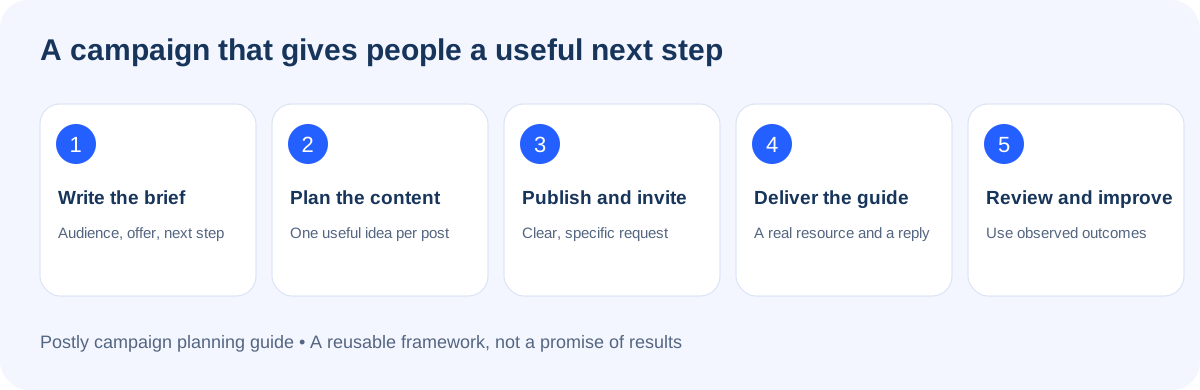
1. Write a brief before writing posts
Copy these prompts into your campaign notes:
- Audience: Who needs this, and what are they trying to do?
- Problem: What specific difficulty does your offer help with?
- Offer: What will the person receive? Link to the actual resource, product, or service.
- Primary action: Choose one: read the guide, start a trial, book a call, or buy.
- Proof: Which demonstration, screenshot, example, or approved testimonial supports your message?
- Owner: Who will answer questions and follow up?
- Success measure: Choose an outcome you can actually observe, such as guide visits or qualified conversations.
Worked example: A small business wants to plan next week's content without starting from a blank page. The offer is this free campaign-planning guide. The primary action is to open the guide and complete the brief. The team will review questions and guide visits after seven days. No signup is required to read this page.
2. Build the week around different questions (optional template)
| Day | Audience question | Content to prepare | Suggested next step |
|---|---|---|---|
| 1 | Why does planning feel difficult? | A short post about switching between disconnected tasks. | Read the campaign guide. |
| 2 | What does a useful brief look like? | Show a completed brief with one audience and one goal. | Copy the brief prompts. |
| 3 | How do I turn an idea into several posts? | Demonstrate three angles: problem, example, and answer. | Draft three post ideas. |
| 4 | How do I stay consistent? | Show the week's planned content in a calendar. | Choose a realistic publishing schedule. |
| 5 | What happens when people ask questions? | Explain the guide keyword and the human support path. | Message POSTLY GUIDE to request the resource when the published channel instructions offer it. |
| 6 | What might stop me getting started? | Answer a real, recurring question without inventing testimonials. | Ask a specific question. |
| 7 | What should I improve next week? | Share what you learned, using real observations. | Keep the strongest topic and improve one weak step. |
Adapt the schedule to your audience and available time. Seven days is a planning framework, not a requirement to post every day or a promise of reach.
Keep the campaign running
Repeat the cycle at a pace you can maintain. Each cycle, keep the same useful resource and request phrase, but use a fresh example, demonstration, customer question, or angle. Do not automatically repost identical material without reviewing whether it is still helpful.
- Daily or on your working days: Check new conversations, failed replies, and questions needing a person.
- Weekly: Review the next batch of posts, answer one recurring question in the guide, and test the resource link.
- Monthly: Review the offer, account connections, and outcomes. Refresh examples that are dated and remove claims you cannot support.
- When the offer changes: Update this resource at its existing URL, then review the matching replies and scheduled posts.
The campaign can continue until you decide to pause or replace it. An active auto-reply with no day or hour restrictions remains available for matching incoming messages while its account connection and platform permissions stay valid. It does not send scheduled messages repeatedly to the same person just because the campaign continues.
3. Prepare the campaign in Postly
Open your workspace and Campaigns. Give the campaign a descriptive name, add the brief, and prepare the content you intend to publish. Review each destination's text, media, links and scheduling options before scheduling. Use the calendar to check the actual dates and time zone.
For the product workflow, see Campaign Content and Reports. This planning template is not a CSV import file; follow the product's current import template if you use bulk publishing.
Before scheduling each post:
- Check that the destination account belongs to the intended workspace.
- Open the destination link on mobile and confirm the promised resource exists.
- Use media you own or have permission to publish; add captions or descriptive text where supported.
- Match the call to action to the destination. A plain URL in an Instagram caption is not the same as a tappable website link.
- Preview the post and check its scheduled time zone.
- Assign someone to review replies after publication.
4. Make the reply deliver the promised value
An automation should help someone who has asked for something. Create the resource first, then add its live URL to the reply. Use a distinctive phrase so unrelated conversations are less likely to trigger it.
Example post invitation:
Want a repeatable content plan? This free guide includes a campaign brief, a content rotation, and a review checklist. Message POSTLY GUIDE and we'll send the link.
Example requested-resource reply:
Here is the campaign-planning guide: https://postly.ai/docs/help-docs/campaign-planning-guide
Start with the brief, then choose a content rhythm you can keep using. What are you promoting: a product, a service, or an event?
Use the invitation only after the matching automation is active on that channel. A DM rule responds to incoming messages; it does not make a comment rule or a new promotional post automatically. Keep a clear path to a person for questions the resource does not answer.
5. Review outcomes and make one improvement
Record the publication dates, the links used, the questions people asked, and the next step taken. Use Postly's available reports and your website analytics for the data they actually provide. A successful automated send is not evidence that someone read the guide or became a customer.
| Observation | Useful adjustment |
|---|---|
| People see the post but do not ask for the guide. | Make the benefit and request phrase clearer. |
| People request the guide but ask where to begin. | Put the first action near the top of the guide. |
| The same question keeps appearing. | Add a direct answer and link to that section. |
| A reply fails or the account needs reconnection. | Check automation activity and reconnect the account before promoting the keyword again. |
| Questions need individual attention. | Move the conversation to a teammate and avoid repeating automated prompts. |
Reusable launch checklist
- One audience, one offer and one primary action are written down.
- The linked resource is live and useful on a phone.
- Every scheduled post has been reviewed for its destination.
- The response sends the correct live resource.
- A separate personal account has tested the request and received the reply.
- A person owns the inbox and the review date.
- Results will be reported from real activity, without promised growth figures.