01
Connect the right ad accounts
The planned account workspace will group your Google and Meta accounts by platform, with clear connection status and options to add, reconnect or disconnect an account.
Explore connect the right ad accounts →Ads creation & management
Coming soon
A planned home for Google Ads, Facebook ads and Instagram ads alongside your social publishing. Set up a campaign with guidance, review its settings and use performance evidence to decide what to do next.
Create responsive Search ads with phrase-match keywords, headlines, descriptions, a website destination, country targeting and a maximum cost per click. Create responsive Display ads with landscape and square images, a business name, a long headline and supporting text assets.
Review currency, daily budget, creative and targeting before creating a paused campaign. Browse accessible existing campaigns, pause or activate a campaign, review daily-budget changes, refresh results and inspect recent activity. Shared budgets and advanced bidding remain in Google Ads.
The ad-type chooser will also explain Performance Max, Shopping, Demand Gen, YouTube/video and app campaigns, with links to native setup. These specialist campaigns are not created inside Postly in this release. Merchant Center, product feeds, asset groups and app tracking require their own configuration.
Explore the planned workflow →Choose an authorized Meta ad account and Facebook Page. Prepare single-image or single-video campaigns for traffic, awareness, engagement, website leads or website sales, with Feed or Stories placement. Website conversion campaigns require a pixel and event. Review the audience country, daily budget, beneficiary and payer.
Boost post connects publishing with advertising. Open the menu on a published Postly post, choose its Facebook version and review a paused engagement campaign. Postly checks the saved publishing receipt, Page access, visibility and the eligibility information Meta provides. The original post is reused, not republished.
Pause or activate accessible campaigns, review supported daily-budget changes and use Facebook ad insights to plan the next test. Carousel, collection/catalog ads, instant lead forms, messaging and app promotion remain native-setup formats, with relevant guidance in the chooser.
Explore the planned workflow →Create image or video ads for an eligible Instagram identity linked to the chosen Facebook Page and Meta ad account. Choose Feed or Stories and a supported campaign goal. Prepare a 9:16 asset for Stories, check the preview, and review targeting and budget before saving paused.
Boost a successfully published Instagram feed post or reel from its Postly post menu. If a post was published to several networks, choose only the Instagram receipt. Facebook, LinkedIn and other versions remain untouched. Account ownership and supported media are checked; Meta makes the final decision on music rights, content restrictions and promotion eligibility.
Instagram ad management and insights keep the account, campaign, currency and reporting period visible. Compare Instagram performance with Facebook or Google while considering different objectives and attribution. Native-only creative formats and advanced settings remain available through Meta Ads Manager.
Explore the planned workflow →01
The planned account workspace will group your Google and Meta accounts by platform, with clear connection status and options to add, reconnect or disconnect an account.
Explore connect the right ad accounts →02
Choose Google Search or Display, or Meta image and video ads for traffic, awareness, engagement, website leads and website sales. Work through identity, destination, audience, creative and budget. Specialist formats have a guide and a link to native setup.
Explore build with a guided workflow →03
New campaigns are planned to start paused. Review the account, targeting, creative and budget before a separate activation step. Connecting an account alone will not start spending.
Explore review before activation →04
The initial management workflow is planned around campaign status and budget changes, with a clear summary before applying them. Advanced configuration will remain accessible in the native ad platforms.
Explore manage existing campaigns →05
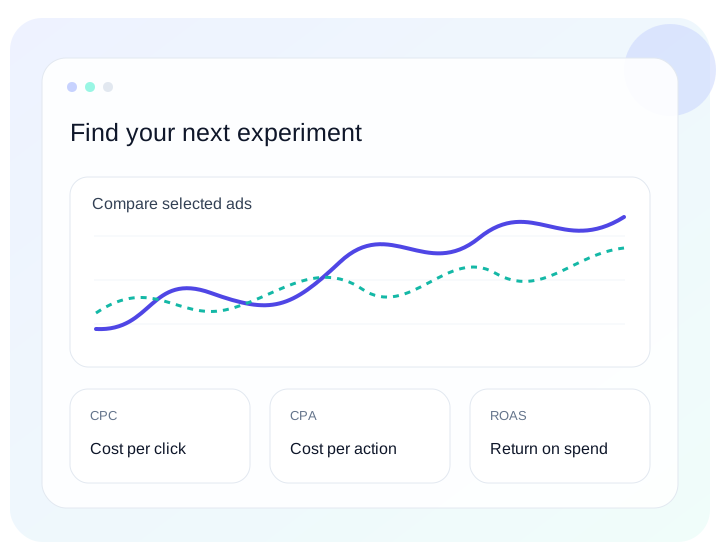
Products → Ads will contain creation and management. Analytics & insights will contain ad reports and comparisons, keeping operational changes separate from performance analysis.
Explore turn reporting into the next action →06
The planned shared workspace will bring account context, campaign activity and reporting closer to the people planning your content. Network permissions and account access will still apply.
Explore coordinate client and team work →07
Start from the Post menu. Select one successfully published Facebook or Instagram version, choose the matching advertising identity and review audience and budget. Failed deliveries and unsupported stories are excluded; other channels are untouched. Meta still controls final eligibility.
Explore boost a published facebook or instagram post →08
Reuse workspace media, check image dimensions and aspect ratio, validate MP4 encoding and duration, and choose a video thumbnail. Image fitting saves a separate JPEG copy with padding so the original stays intact. Video conversion and provider policy fixes remain manual.
Explore validate and preview ad media →09
List ads across connected accounts or filter by ad account, network and status, including paused ads. Search, choose custom dates or available all-time history, select at least two ads to compare, open ad details and export CSV, PDF or branded PDF. Insights guide a test rather than promising a winner.
Explore compare, export and act on insights →010
Group accounts by platform, search connections, add or reconnect access, select accounts and disconnect them when no longer needed. Each connected ad account uses a channel. Meta reporting access and management authorization are separate.
Explore connect, authorize and disconnect accounts →A little more clarity
No. Ads creation and management are coming soon and are not available to customers yet. The workflows on this page describe the planned product. No launch date has been announced. Access is planned for Pro and Enterprise, plus LTD accounts with API access.
The guided creation scope is Google Search and Display; Facebook and Instagram image/video ads for traffic, awareness, engagement, website leads and website sales; and eligible published-post boosts. Performance Max, Shopping, Demand Gen, YouTube/video and app campaigns, plus Meta carousel, catalog, instant-form and messaging formats, will be listed with native setup guidance. Those specialist formats are not created inside Postly in this release.
No. The planned workflow separates connection, creation and activation. New campaigns will start paused and require a separate activation step.
Yes. The planned management workflow is intended to work with accessible existing campaigns as well as supported campaigns created through Postly. You can continue using the native platforms.
Advertising spend remains separate from the Postly subscription and is billed by the advertising platform. Postly Ads is planned for Pro and Enterprise, plus LTD accounts with API access. Other plans, including legacy subscriptions, will need to upgrade.
Cross-account and cross-platform comparisons are part of the planned reporting workflow. Currency, attribution, reporting dates and missing metrics must be considered; a comparison does not prove a causal winner.
That is the planned workflow. Boost post isolates the successful Facebook or Instagram publishing receipt you select. It does not edit, republish or promote the other channel versions. You review a paused campaign before a separate activation.
No. Supported image fitting can save a padded JPEG copy without overwriting the original. Video encoding problems, music rights, advertising policy issues and specialist creative formats need your review or native tools.
Connect, reconnect and disconnect ad accounts; create supported campaigns paused; select a published post to boost; review settings; pause or activate campaigns; edit supported daily budgets; inspect recent activity; refresh, search and filter ads; compare selected ads; and export CSV, PDF or branded PDF reports. Advertising billing, destructive deletion, advanced targeting and native-only creation formats remain in the advertising platforms.
Ads will be available to Pro and Enterprise subscribers. LTD accounts need API access. Other plans, including legacy subscribers, must upgrade. The feature is still coming soon; an eligible plan does not provide access before launch.
Less reporting friction. More perspective.
Google Ads reporting — Coming soon →