
An auto-reply should deliver something the visitor requested. This walkthrough uses the real, freely accessible ongoing campaign guide. Keep the guide current at the same URL so existing replies remain useful.
Watch the narrated Postly walkthrough on YouTube (3 minutes). The edited video uses real dashboard captures and Onu narration to cover channel selection, keyword replies, comment rules, conversation starters, and delivery verification.
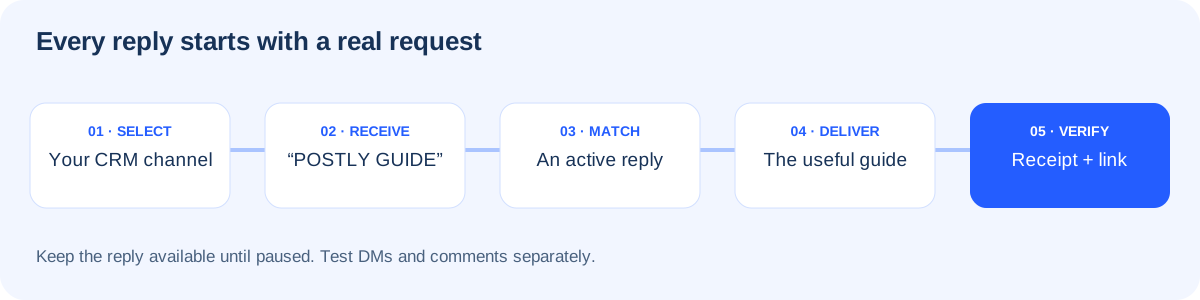
Connect, select, and verify
Connect the correct Facebook Page or Instagram professional account in Platform connections. Then open Inbox > CRM channels, select the accounts, and choose Save channels. Connecting an account does not automatically select it for CRM. Read channel selection and limits for details.
In Auto-replies > DMs > Accounts and help, select the account to verify permissions and webhook subscriptions. If a session is invalid, reconnect the intended account before promoting the automation. During our setup, Instagram rejected a session even though its displayed expiry date was later; verification exposed the problem.
Create a useful DM reply
Choose DMs > New DM automation and use this example:
| Field | Value |
|---|---|
| Automation name | Facebook · Campaign guide |
| Type | Keyword reply |
| Connected account | Your intended Facebook Page |
| Keywords or phrases | POSTLY GUIDE, CAMPAIGN GUIDE |
| Matching | Message contains a keyword |
| Active days and hours | Leave days unselected for any time |
Write the response with its real link:
Here is your free campaign guide: https://postly.ai/docs/help-docs/campaign-planning-guide
It includes a practical brief, content ideas, and a repeatable plan you can keep using. Start with the brief, then choose your publishing rhythm.
What are you promoting: a product, a service, or an event?
Save, review the rule, and choose Activate when ready. Create a separate rule for Instagram with its account selected. Keyword matching is not case-sensitive. A saved draft is not evidence that the rule is active or that delivery works.
There is no seven-day expiry. The reply can continue until paused, subject to its schedule, account connection, permissions, and platform eligibility. The guide's optional weekly content template can be repeated.
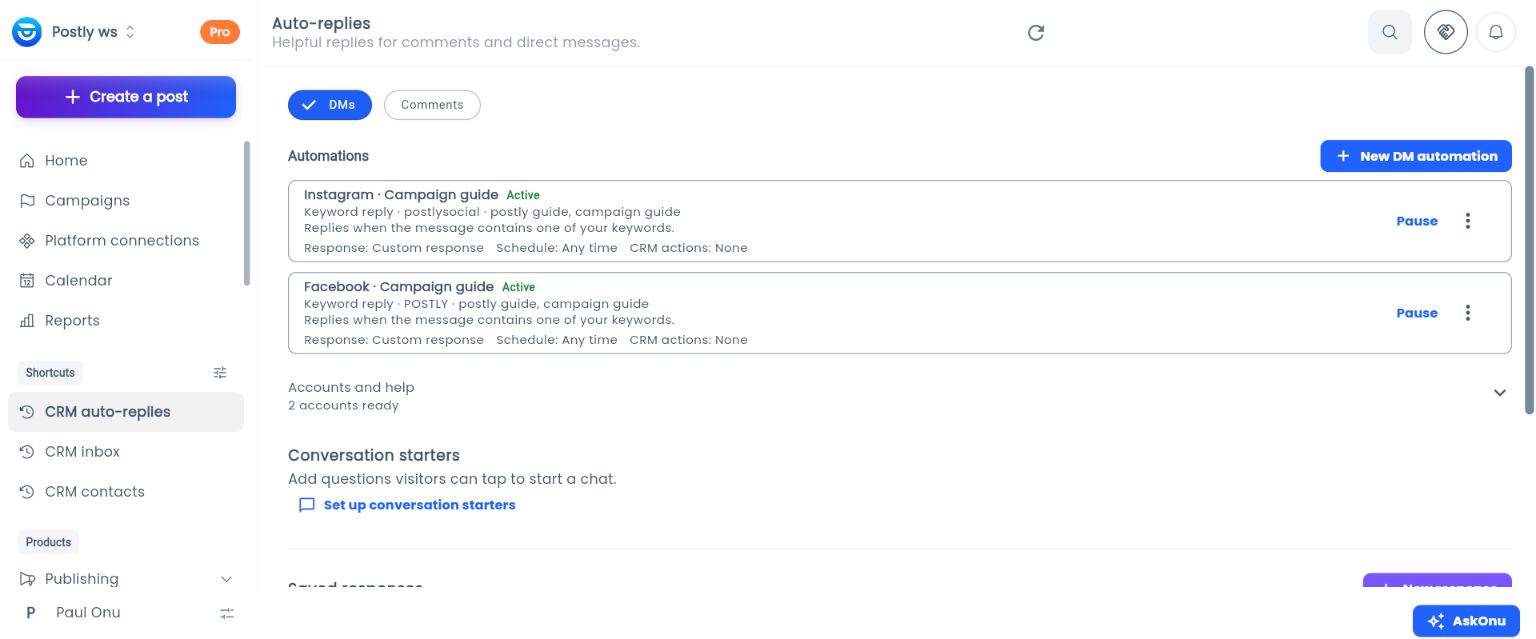
This screenshot shows the saved configuration. Verify delivery separately using the steps below.
Set up a comment reply
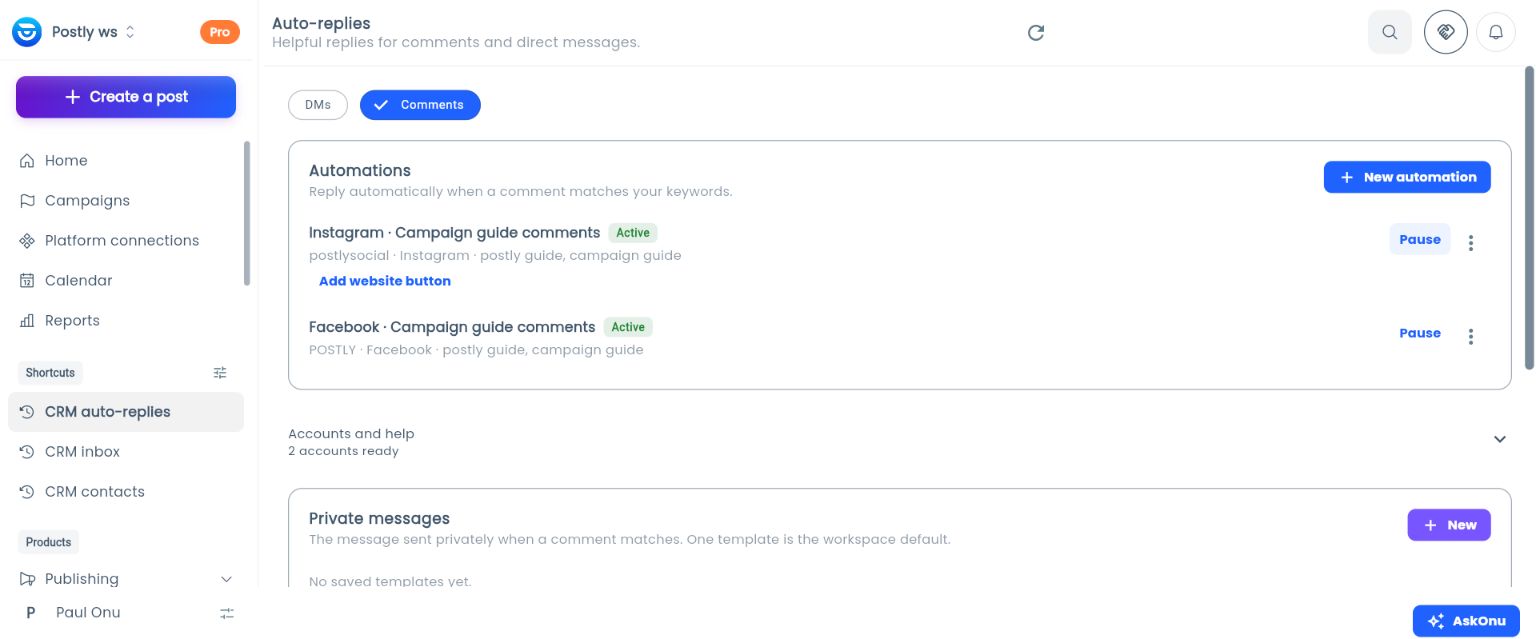
Choose Comments > New automation. Select the intended account and add a distinctive phrase such as POSTLY GUIDE. Enable Send a private message and include the live guide URL. If you enable Post a public reply, avoid claiming delivery before it is confirmed. For example: “Thanks for asking! You can also message us POSTLY GUIDE for the campaign resource.”
Comment rules apply account-wide to eligible incoming comments, including posts published outside Postly. Review existing rules to avoid unwanted matches. A comment rule is not a bulk message to previous commenters.
Share Instagram links on desktop and phone
Start with a direct link in the message. In our October 5, 2026 tests, full URLs were clickable on Instagram's desktop website and phone app for both DM and comment-triggered replies.
- For a DM rule, paste the full
https://URL into Automated response. For a comment rule, paste it into Private message: the automatic DM someone receives after commenting, not the public comment reply. If you use a saved response, edit its text instead. - For an Instagram comment rule, leave Add a website button off and save. This controls a separate button such as “Open link”; it does not turn off links in the message.
- Trigger a fresh reply from another account, then open the same reply and click its link on desktop and phone. For comment rules, use a different tester or post if that person already received a reply from the rule on that post.
Keep the message short: one sentence and the full URL on its own line is enough. Instagram may add a link preview automatically; that preview is separate from the optional website button.
Website buttons remain optional. In a reported case, the button appeared in the phone app but was missing on desktop. Direct links are our recommended starting point, not a guarantee for every account or device. Test DM and comment rules separately, and repeat the check after changing the message or destination.
Add Instagram conversation starters
In DMs, choose Set up conversation starters. Select the Instagram account, enter a clear question, and link it to an active DM automation. For example, Can I get the campaign guide? can trigger the guide response. Choose Save to Instagram and check the result.
This editor currently configures Instagram starters. Facebook DM keyword rules are separate; saving here does not configure a Facebook Messenger menu.
Add a Facebook starter in Meta Business Suite
Open the intended Page in Meta Business Suite > Inbox > Automations > Frequently asked questions. In the Messenger tab, add Can I get the campaign guide? as a suggested question. The phrase “campaign guide” matches the Postly keyword rule above. Leave the native automated response empty when Postly should provide the answer, then save. This avoids configuring a second answer for the same request.
We saved this question for the POSTLY Page during the walkthrough. Meta reports that changes may take time to apply. A visitor subsequently confirmed that the question appeared and tapping it delivered the guide. Keep Instagram's questions in its own starter editor, and test each platform separately.
Verify the complete journey
- Confirm the rule is Active and the resource opens without signing in.
- From a separate personal account, send the configured phrase to the Page or professional account.
- Confirm receipt of the intended reply and open its link.
- Test comments separately on an appropriate post; a successful DM test does not verify comment delivery.
- Review Automation activity for matches, sends, failures, and handoffs.
- Keep a person responsible for follow-up questions.
During our live setup, separate-account tests initially received no response. We corrected routing that could select a historical connection in a different workspace. Fresh Facebook and Instagram DM tests then both received the intended guide reply. Instagram comment delivery also passed. Facebook comment delivery required a separate correction to use Meta's Page messaging endpoint, then a fresh comment received the requested guide privately. On September 24, 2026, visitors verified all six paths: DMs, comment-to-private-message replies, and conversation-starter taps on both Facebook and Instagram.
Review failures and questions regularly, and update the guide when the offer changes. Pause replies if the resource is unavailable. See the Auto-replies FAQ for ongoing operation and troubleshooting.
Workflow rules, SLAs, and team digests are retired. Existing saved records are retained; these workflows no longer run.
Automatic contact collection and requests
Automatic contact collection and requests are on by default for new workspace settings. Owners can turn automation off; existing explicit opt-outs remain respected. Manual entry and requests are also available. Configure specific trigger phrases, request copy, secure forms, and cooldowns under Auto-replies > Contact requests. Clear declines suppress requests, but keyword matching does not understand every conversational context.
Owners can use CRM workspace access to review and enable or disable CRM across workspaces. Disabling releases CRM allocations without buying or cancelling capacity or changing publishing connections.
Explore Facebook and Instagram Auto-Replies for DM keyword replies, comment-to-DM automation, and practical use cases.