
Delete from Postly
Removes the post from Postly. Published copies stay live on the platforms.
Content management
Prepare your media, check publishing requirements, and manage your posts with practical guides for every step.
Browse content guides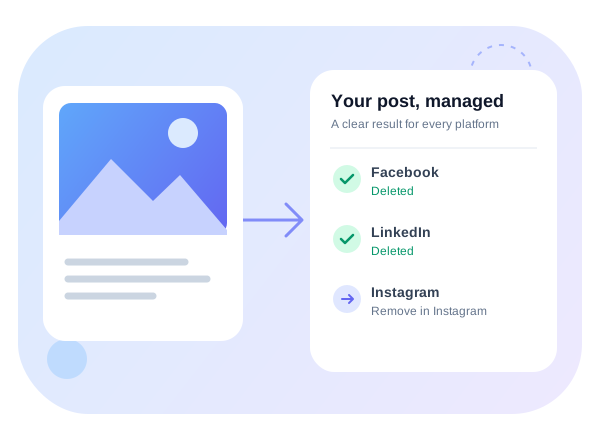
Check supported post types and media requirements by destination.
Compare file sizes, durations, and plan upload allowances.
Understand video checks and what needs changing before publishing.
Prepare images for your connected channels.
Review video preparation and export guidance.
Understand publishing pace, recurring limits, and why posts wait.
Find platform examples and publishing troubleshooting.
Prepare and import multiple posts.
Plan repeat publishing schedules.
Resolve connection, permission, and publishing issues.
Compare deletion actions and check platform support below.
Browse detailed workflow guides.
Use practical content planning and reporting worksheets.
Find calculators, generators, and publishing utilities.
Open a published post’s menu and choose Delete.
Removes the post from Postly. Published copies stay live on the platforms.
Deletes live copies where supported. Keeps the post in Postly so you can review the results.
Deletes supported live copies first. Removes the Postly post only when every destination is resolved.
If a platform is unsupported or deletion fails, Delete Everywhere keeps your Postly post. Resolve the remaining copy before removing it from Postly.
Live deletion is a dashboard feature. You need access to manage the original post. Check the result for every platform.
| Platform | Live deletion | What to know |
|---|---|---|
| Supported | Deletes published Page posts. Review each live copy. | |
| Not supported | Delete posts, carousels, Reels and Stories in Instagram. | |
| Supported | Deletes posts you have permission to manage. | |
| X / Twitter | Supported | Deletes posts and saved thread replies. |
| Google Business Profile | Supported | Deletes posts from your location. |
| Supported | Deletes published Pins. | |
| YouTube | Supported | Deletes videos, including Shorts. |
| TikTok | Not supported | Delete the content in TikTok. |
| Threads | Supported | Up to 100 deletions per account per day. |
| Bluesky | Supported | Deletes published posts. |
| Telegram | Supported | Only messages less than 48 hours old. |
| Discord | Supported | Deletes messages Postly has permission to remove. |
| Not supported | Sent messages cannot be recalled through Postly. | |
| WordPress | Supported | Removes live posts. WordPress.com may keep them in Trash. |
| Ghost | Supported | Deletes published articles. |
| Hashnode | Not supported | Delete the article in Hashnode. |
| DEV | Unpublish only | Moves the article to drafts; it is not permanently deleted. |
| Blogger | Supported | Deletes published articles. |
Results show what happened in Postly and on each platform. If Facebook and LinkedIn are deleted but Instagram needs manual removal, you’ll see all three outcomes. Postly keeps the post until the remaining work is resolved.
Example result
Delete them from Postly before publishing starts. Pause recurring schedules and automations separately to prevent another post.
API and MCP Delete Post actions remove the post from Postly only. Use the dashboard for supported live deletion.
Remove the live copies directly on each platform. Postly cannot delete a live copy using only its platform ID after the Postly post is gone.
The Delete workflow removes the published copy, not an individual image. Use the platform’s own editing options where available.
Pause future publishing, save the live links, then remove each live copy. Verify the results before deleting the post from Postly. For client accounts, arrange the right access and an approval process in advance.
Use the Content Format Guide before publishing, then the platform results below to manage removal.
A ten-image publishing allowance does not mean ten separate posts were created or deleted. A Facebook Multi-image Feed Post, a Facebook Linked Carousel with individual card URLs, and an Instagram Image Carousel are different formats. Reels and Stories are separate live copies for each published file.
Postly’s Delete workflow works on saved published copies; it is not an editor for removing one slide from a carousel or one photo from a feed post. Review every copy in the results, especially when you selected Feed, Reels and Stories together. For changes within a published post, use the platform’s own editing controls where available.
See the Content Format Guide for attachment counts and publishing requirements.
DELETE /posts/{postId} and postly_delete_post (also exposed as postly.delete_post) are Delete from Postly operations for every platform. They do not call the provider to delete live content. The ID must be the Postly post ID, not a Facebook post ID, Instagram media ID, or other provider ID.
There is currently no public API or MCP live-deletion action and no Postly action that accepts only a provider ID after the post in Postly has been removed. Preserve IDs and URLs before deleting. If the post is already gone, use the platform directly; contact support with those references if you need help identifying the content, without assuming the post can be restored.
Results are grouped by post. Each group shows Postly — Deleted, Postly — Kept, or an outcome that needs attention, followed by the result for each platform. Multiple live copies have their own details. Retry keeps completed removals and attempts unresolved copies again.
For example, if Facebook and LinkedIn are deleted but Instagram is unavailable, the results show Facebook: Deleted, LinkedIn: Deleted, Instagram: Not available, and Postly: Kept. Delete the Instagram post directly, verify it is gone, then use Delete from Postly if you want to remove the remaining post from Postly.
The dashboard results dialog is the deletion report. A publishing email, Slack notification, Discord notification, or generic Delete from Postly success does not establish that live content was removed.
Reviewed September 30, 2026. The table describes what you can do through Postly. A platform’s wider API capabilities do not automatically mean the feature is available in Postly. Platform rules determine which live actions can succeed; the dashboard reports the outcome for each published copy.