Pinterest board planner: organize upcoming Pins
Plan Pins for a connected Pinterest board with clear distinctions between board selection, publishing order and Pinterest’s live layout.
Reviewed 15 October 2026 · Postly product guide
Choose a board before judging the mix
Pinterest content belongs to boards and may belong to board sections. Select the intended connected board before comparing planned Pins. A product collection board and a how-to board may need different imagery, titles and destinations even when they belong to the same account.
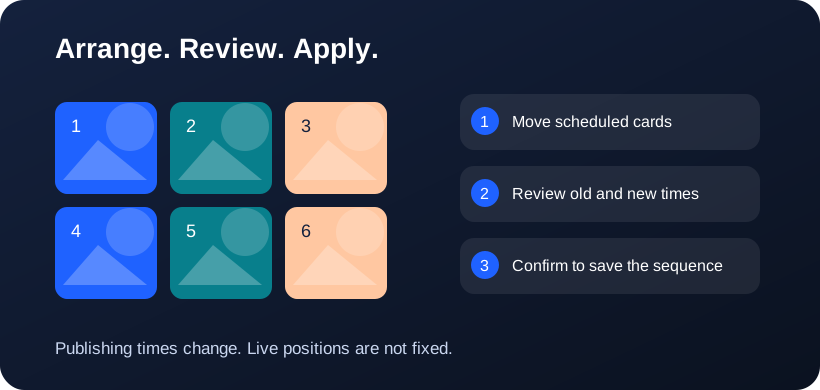
Arrange, review, then apply
Schedule posts for the selected account first. Drag scheduled cards to exchange their publishing times; the latest scheduled time appears first. An Unsaved schedule changes panel appears beside the cards only after you change their arrangement. Choose Review schedule changes, compare the old and new times, then confirm Apply schedule changes. This saves the publishing sequence for this account; it does not publish immediately, move live posts or guarantee fixed profile positions. Undo arrangement discards the proposal.
Compare creative and destination together
Review the image, title and destination link for each Pin in the publishing editor. Keep a useful mix of products, tutorials and relevant evergreen content. A board preview helps reveal repeated designs, but visual variety alone does not establish whether a Pin answers a useful search intent.
Use API context without promising a fixed layout
Pinterest’s API supports listing Pins on a board and creating image or video Pins. Pinterest controls how boards and feeds are displayed. A Postly 3×3 or 4×4 canvas is an editorial workspace; it is not a command to force the live board into a fixed mosaic.
Apply timing deliberately
Drag upcoming scheduled items to propose a new publishing sequence and review the changed times. Use the existing editor for board-specific content and scheduling. Publishing separate Pins is different from arranging slides inside a carousel; do not rely on a split artwork remaining adjacent in a Pinterest feed.
Frequently asked questions
Does moving a tile reorder existing Pins on Pinterest?
No. The planner does not claim native board rearrangement. Applying a proposal changes supported upcoming publishing times.
Should I split a picture into a Pinterest mosaic?
Treat each Pin as independently useful. A fixed mosaic cannot be guaranteed in Pinterest’s live layouts.
Why does 3×4 look like 3×3 at the top?
Both have three columns. 3×4 adds a fourth row, giving 12 slots instead of 9. Scroll down to see the extra row. These dimensions control the Postly canvas, not a provider API setting.
Related workflows
- Explore the related Postly workflow
- Instagram grid planner: preview posts before scheduling
- TikTok content planner: plan videos and cover sequences
- 3×3, 3×4 or 4×4: choose a social planning grid
- Image grid splitter: turn one design into numbered posts
- How to reorder post images before publishing
- Fix all post images: repair a batch before publishing
- Social planner APIs: Instagram, TikTok and Pinterest
Provider references
Provider capabilities and account permissions can change. These guides distinguish documented API functions from Postly planning controls.