
Skip to content

Agentic social media management

Your AI agents.
Your publishing platform.

Turn ideas into scheduled campaigns with your preferred AI assistant. Connect business workflows through Zapier and Make, and manage content, approvals, and results in Postly.

Try Postly Pro for 14 days. No card required.

A workflow you can run

“Prepare next week’s posts from this launch brief.”

  1. Ask your assistant
  2. Review the content
  3. Confirm the schedule
Your content. Ready for review.
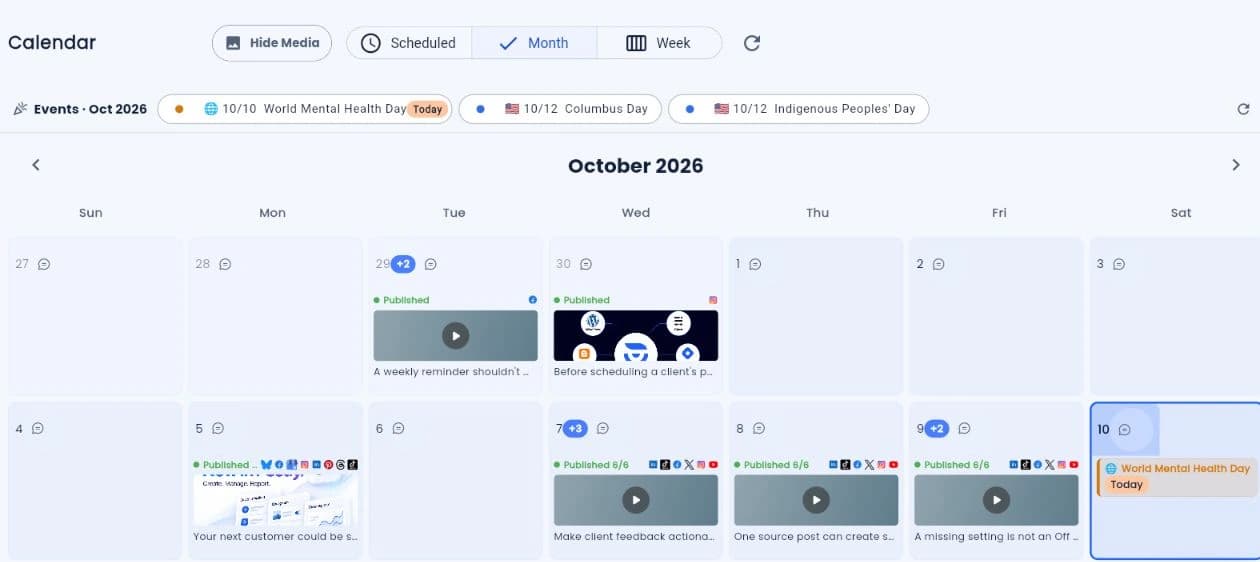
Postly publishing calendar with published posts and channel indicators.
Your assistant prepares. You stay in control.
Example brief above · Actual Postly calendar below

Your AI assistant. Your Postly workspace.

From a conversation
to your next campaign.

Bring your preferred assistant. Plan, draft, schedule, and review with your authorized Postly workspace.

Explore AI agents

Requires Postly API access. Setup varies by assistant. Review content and destinations before publishing.

Connected workflows

Your business apps. Your publishing workflow.

Use Zapier for event-to-action workflows and Make for visual scenarios. Keep content and publishing results in Postly.

Setup and workflow guides
Explore publishing channels and connected tools

The Postly advantage

More reach. Less busywork.

Distribute your campaigns across channels.
Make every piece of content work harder.

Distribution

Your audience.
Everywhere you publish.

Explore all channels

Social

  • X / TwitterPosts, long-form posts, threads, replies, media, and advanced publishing automation.
  • InstagramFeed posts, carousels, Reels, Stories, tagging, collaborators, first comments, and mobile audio reminders.
  • FacebookFacebook Page feed posts, carousels, Reels, Stories, first comments, and mobile profile sharing.
  • YouTubeVideos and Shorts with titles, descriptions, tags, thumbnails, first comments, and audience controls.
  • LinkedInProfile and Page posts, articles, documents, mentions, CTAs, targeting, UTMs, and first comments.
  • TikTokFeed videos and image posts with titles, privacy, engagement, and disclosure controls.
  • PinterestImage, video, link, and multi-page Idea Pins with destination URLs and tracking.
  • Google Business ProfileLocal updates, events, offers, and product promotions using Update posts with calls to action and links.
  • BlueskyPosts and threads with media, tags, language declarations, and content labels.
  • ThreadsSingle posts and multi-post threads with mentions, reply controls, and quote controls.

Email

  • Postly MailSend with Postly’s managed email service. Managed sending is a separate add-on.
  • ActiveCampaignEmail campaign support for ActiveCampaign
  • BeehiivEmail campaign support for Beehiiv
  • BrevoEmail campaign support for Brevo
  • KitEmail campaign support for Kit
  • MailchimpEmail campaign support for Mailchimp

Messaging

  • TelegramChannel and group messages with pins, silent delivery, spoilers, protection, topics, and buttons.
  • DiscordScheduled messages, attachments, forum posts, and announcement publishing for Discord communities.
  • WhatsAppWhatsApp Business template campaigns for opted-in recipients and contact lists. Pro Plan or Enterprise required.

Blogs

  • WordPressSEO-ready WordPress posts with taxonomy, featured media, metadata, schema, and Gutenberg controls.
  • GhostPublish polished Ghost articles with tags, member visibility, featured images, SEO metadata, and social previews.
  • HashnodePublish developer-focused articles to Hashnode Pro publications with complete metadata and workflow controls.
  • DEV.toPublish technical articles and drafts to DEV.to with reusable settings, previews, and schedules.
  • BloggerPublish complete Blogger and Blogspot articles with labels, drafts, previews, and schedules.

Commerce & more

  • WooCommerceCreate recurring campaigns from a connected WooCommerce catalog.
  • eBayCreate recurring campaigns from an authorized eBay seller catalog.
  • Squarespace CommerceCreate recurring campaigns from an authorized Squarespace Commerce catalog.
  • SquareCreate recurring campaigns from an authorized public Square Online product or collection URL.
  • Bio pagesTurn every post into a measurable, click-capturing destination that compounds results.
  • PollsCreate polls and share them with your audience.

Automation

Less work.
More value from every campaign.

Explore automations

Connect your tools. Repurpose content. Keep campaigns moving.

  • APIBuild publishing into your own tools with Postly’s API.
  • MCPLet compatible AI assistants work with your authorized Postly workspace.
  • Auto PostTurn existing content into a repeatable publishing workflow with review controls.
  • RSS feedsUse RSS feeds as a content source for Auto Post.
  • EcommerceBring product content into your marketing workflow.
  • CRM automationsAutomate supported DM and comment workflows in Postly CRM.
  • ZapierPrivate app with early access. Explore the setup guide; public listing is not yet available.
  • MakeAvailable by invitation. Explore setup and workflows; public directory review is pending.
  • The Postly Shopify app is coming soon. Its App Store link will be added when it goes live.
  • The Postly WordPress plugin is coming soon. Its plugin directory link will be added when it goes live.
  • The Postly Chrome browser extension is coming soon. Its Chrome Web Store link will be added when it goes live.

Tap a badge or ⓘ for details. Integrations marked “Coming soon” are not live yet.

Apps & devices

Your workspace, wherever you work.

Explore apps
  • Web appPostly web app. Any device with a supported browser.
  • Install from browserInstall Postly from your browser. Windows, Mac, Android, iPhone and iPad.
  • AndroidGoogle Play. Android.
  • WindowsMicrosoft Store. Windows.
  • App Store. iPhone and iPad. Coming soon; a download link will be added when available.
  • MacMac App Store. Mac.
“Postly feels like a true "command center" for social media—bringing everything into one streamlined, automated workflow.”
Mario F. · Social Media Manager · Read the review on G2
StripeFeatured by Stripe
Read the Postly story ↗

A calmer way to manage social

From your first idea
to a week well planned.

A clear place for every draft, every channel, and everyone involved. Do the work once, then give each post the attention it deserves.

Cobalt blue, cream, and apricot ceramics arranged on a studio table.
THE STUDIO COLLECTIONMade slowly.
Shared thoughtfully.
Create content your audience will want to stop for.

Create & prepare

Find the words. Make it yours.

Shape your idea, organize your media, and tailor each post to its channel with writing help built into the editor.

Explore AI Studio
Your content, in perspective
Postly calendar showing October posts, publishing statuses, connected channels, and month and week view controls.

Plan ahead. Publish with confidence.

Plan & publish

Your whole plan. One calendar.

See what’s published and what’s next. Preview, approve, and schedule social content without losing the bigger picture.

Explore content publishing

Find your next caption with built-in AI writing, then bring your ideas to life with AI Studio images and videos.

Less repetition. More possibility.

Keep your content moving.
Keep your time, too.

Turn the work you’ve already done into your next round of social content. Build a repeatable publishing routine, with review controls that stay in your hands.

Keep your best ideas working for you, long after the first post.

Your blogYour productsYour feeds
A new draft to make your own

A little texture. A little color.
A new story for your feed.

Review before scheduling
Your publishing plan
Give great content a longer life—and get time back.
One launch. Everyone in sync.
Behind the scenes at a ceramics studio.
Behind the scenesA story ready to share.
  1. Prepare the draft
  2. Review together
  3. Schedule the post
Less back-and-forth. More ready-to-publish content.

Made for working together

Fewer loose ends.
A shared plan.

Bring your team and clients into the process. Keep drafts, feedback, and approvals together before anything goes live.

  • Organize content and assets around each campaign.
  • Review posts with your team before publishing.
  • Keep different brands and clients in their own workspaces.

The work after the post

Stay close to your audience.
Learn what to do next.

Publishing is the beginning. Keep conversations moving and bring what you learn into your next plan.

A conversation worth continuing.

Bring supported DMs, comments, and reviews into your social inbox. Keep contact context, auto-replies, and follow-up reminders close by.

Turn everyday conversations into stronger customer relationships.

Turn results into your next move.

Review social media performance, follow campaign delivery, and share reports with your team and clients.

Spot what resonates and make your next campaign more informed.

Room to do more

Start with social.
Take it further.

When your workflow grows, connect the next step—from your audience’s first click to your own publishing tools.

Ads management

Manage Google Ads and analyze Google and Meta ad performance alongside your organic content.

Explore Ads

Available on Pro. Advertising spend is billed separately.

Before you start

Your Postly questions, answered.

What is Postly?

Postly is an agentic social media management platform for creators, teams, and agencies. Connect your preferred AI assistant, automate workflows with Zapier or Make, or use the editor and calendar. Plan, create, approve, and publish posts, then manage conversations and review results. Extend your workflow with automation, ads, Bio Pages, API access, and MCP. Features depend on your plan and connected platform permissions.

Explore the social media scheduler →
Which platforms can I schedule posts on?

Postly supports publishing to Instagram, Facebook, LinkedIn, TikTok, YouTube, Pinterest, X, Threads, Bluesky, Google Business Profile, Telegram, and other supported destinations. Available formats and controls depend on the channel and connected account.

Check supported channels and formats →
How do bulk posting, recurring posts, and Auto Post differ?

Bulk posting imports a prepared batch of posts from CSV or Google Sheets. Recurring posts repeat evergreen content on eligible channels. Auto Post uses sources such as feeds, articles, videos, documents, or products to prepare ongoing content. Choose the workflow that matches your source and review needs.

Explore publishing automation →
Can my team approve posts before publishing?

Yes. Postly supports shared workspaces, drafts, team notes, and approval workflows. Review the caption, media, selected channels, and schedule before content is approved for publishing.

See the approval workflow →
How does Postly help with customer conversations?

Postly CRM brings supported conversations, contacts, auto-replies, and follow-up reminders into a customer workspace. Check channel access and workspace settings before configuring automation.

Explore Postly CRM →
Can I schedule posts from an AI assistant?

Yes. Connect a supported AI client to Postly through MCP, select the authorized workspace and channels, prepare the content, and review the destination and publishing time. Workspace permissions and approval requirements still apply.

Connect an AI assistant with MCP →
Can I manage Google and Meta ads in Postly?

Google Ads creation and management and Google and Meta Ads analytics are available. Meta ad creation and management are coming soon, pending Meta approval. Ads is available on Pro; LTD accounts need API access. Provider permissions apply and advertising spend is billed separately.

Explore Ads management →
How can I try Postly and compare plans?

Start a 14-day trial without a card and test a real publishing workflow with your connected channels. A paid plan is required afterward; you will not be charged automatically. Check the pricing page for current plan features, channel allowances, and any separately priced services before choosing a plan.

Compare current plans →

Your next campaign starts here

Put your agents
to work with Postly.

Connect an assistant, prepare your content, and review the results in one publishing workspace.

Find the right plan for your channels, your team, and your next stage of growth.

Need organization controls, approvals, and rollout support?

Talk to our teamEnterprise Center