Recommended
Postly X-Pro
Connect with X’s secure account sign-in. No developer API keys are required. Each $30 monthly stack includes one managed account and 250 weighted publishing credits; annual billing saves 20%.
X publishing knowledge base
Publish classic or eligible long-form X posts, build regular or numbered threads, attach media to replies, control sensitive media and replies, and automate engagement and cleanup rules. X supports one-off scheduling in Postly; recurring posts are not supported.
Where you can publish
Content formats
Two connection options
Postly X-Pro is the recommended managed option. Technical users can instead bring an X developer app and control provider billing directly.
Recommended
Connect with X’s secure account sign-in. No developer API keys are required. Each $30 monthly stack includes one managed account and 250 weighted publishing credits; annual billing saves 20%.
For technical users
Connect an X Developer app you control. X bills that developer account directly, so you manage API credits, usage, and spending limits at your own pace.
Handled inside Postly
Sent to X
BYOK setup
Follow these steps only if you chose Bring Your Own API Keys. Postly X-Pro users can skip this guide and continue through secure X sign-in.
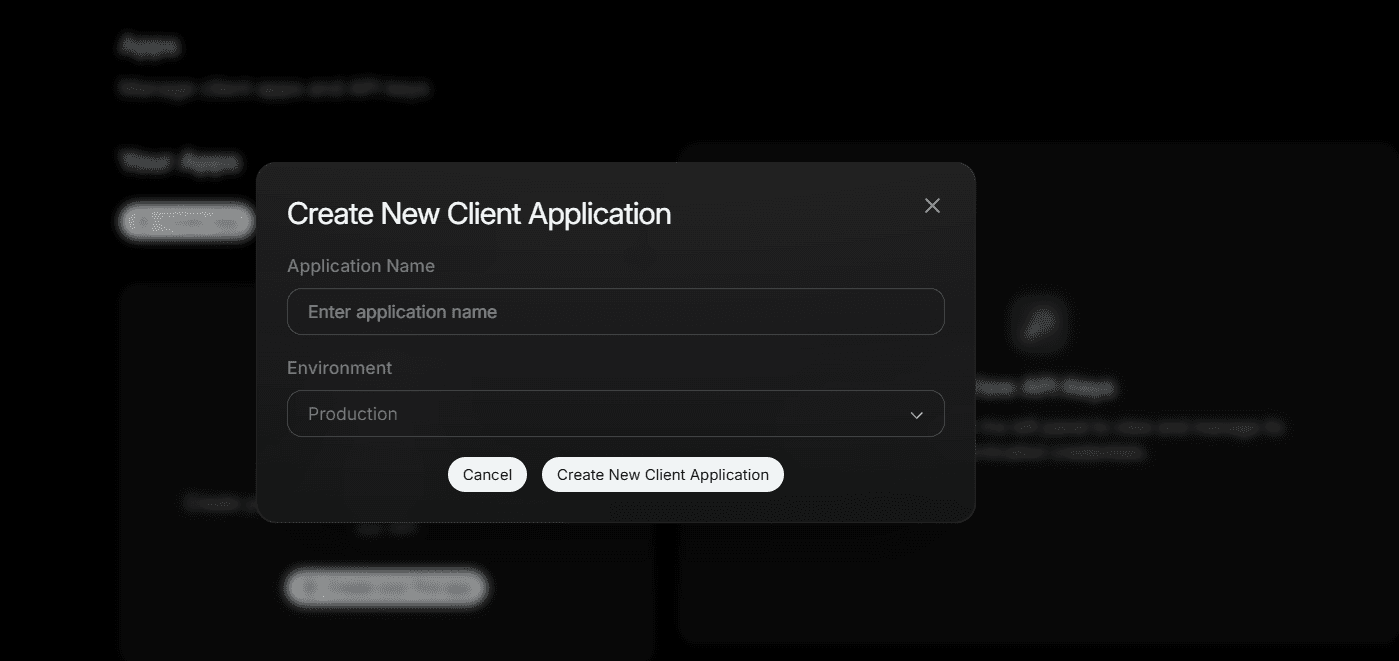
Open the X Developer Console, go to Projects & Apps, and create a new client application for Postly.
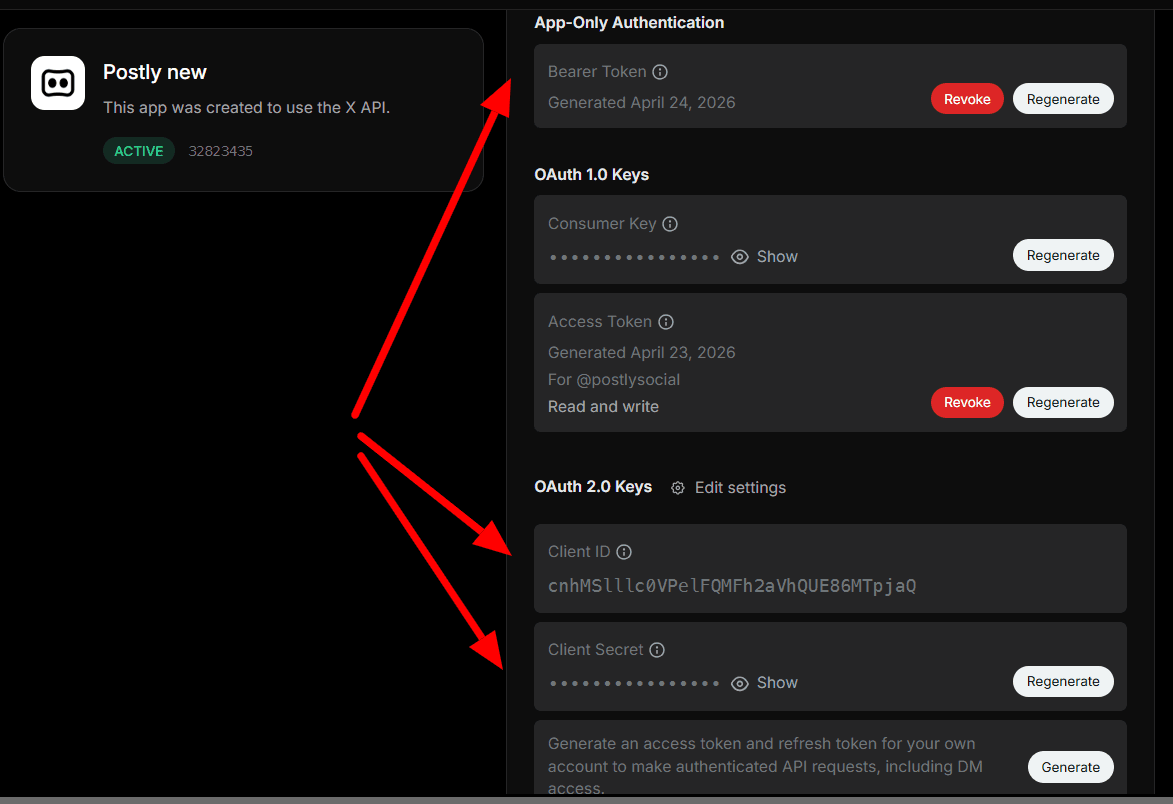
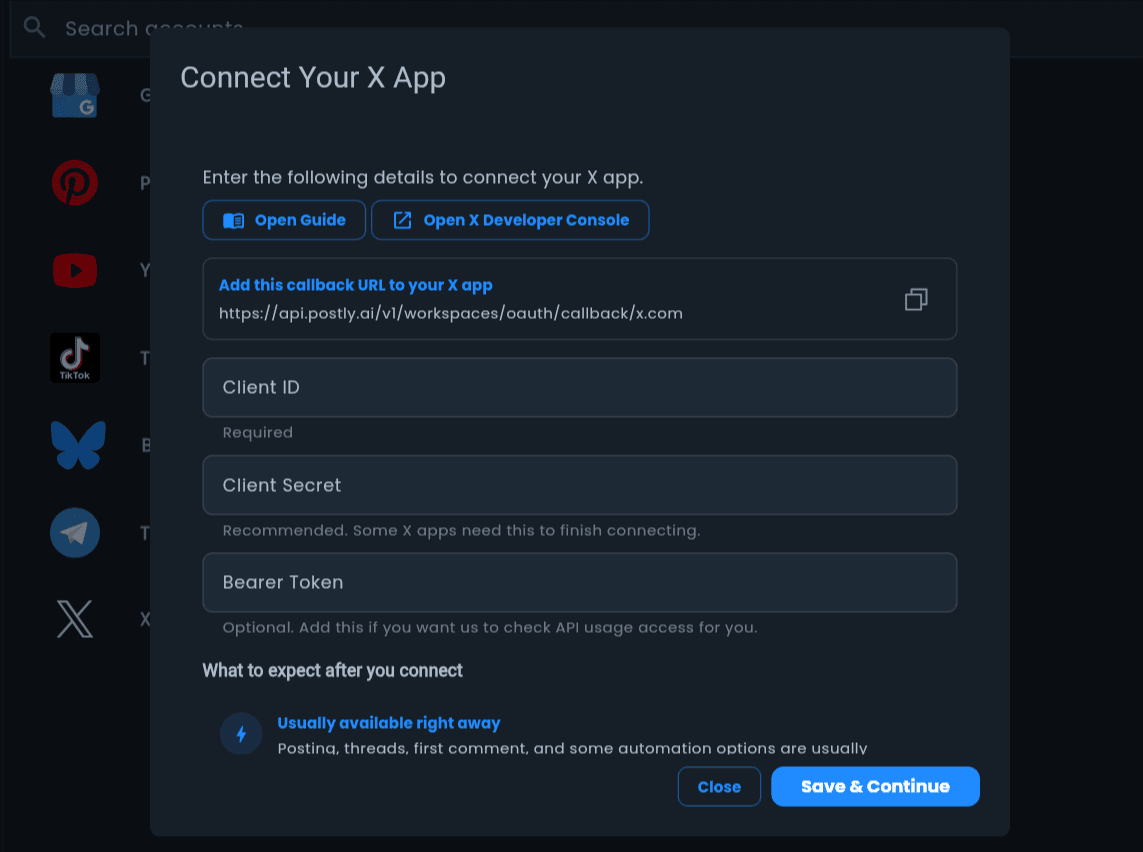
Copy the OAuth 2.0 credentials shown by X. Postly requires the Client ID, recommends the Client Secret for confidential apps, and accepts an optional Bearer Token for usage-monitoring and billing-backed capabilities. Some values may only be shown once.
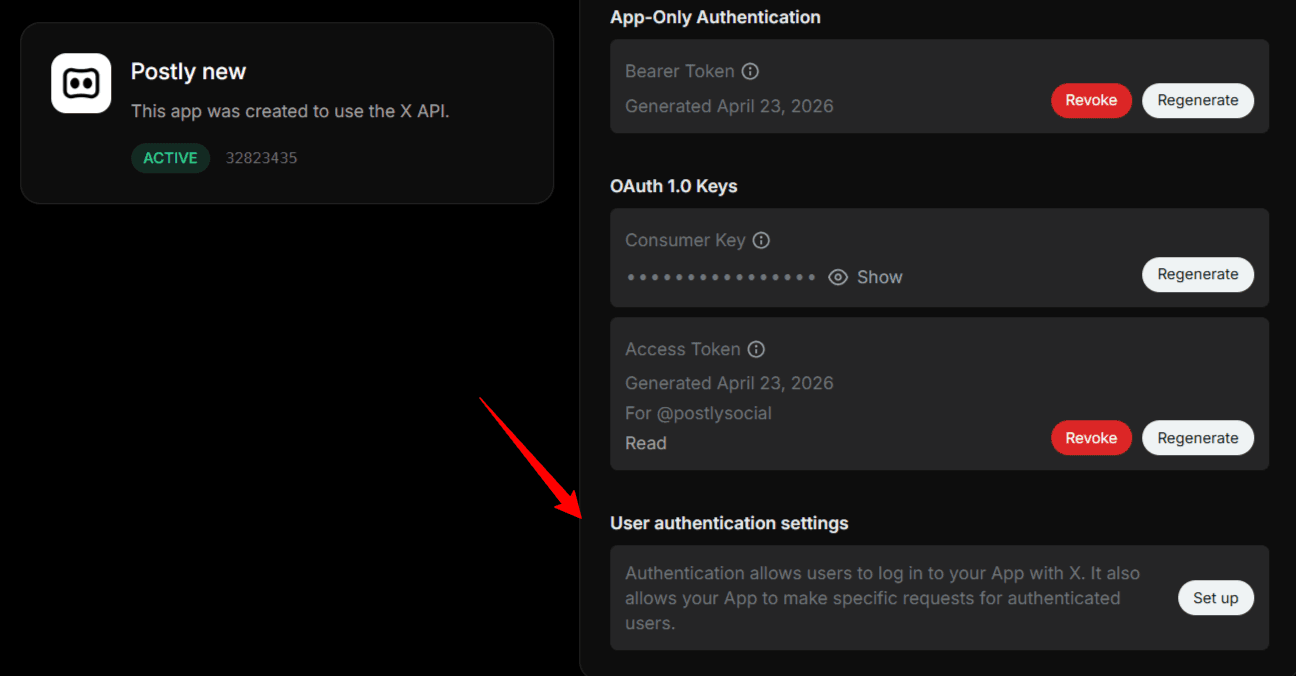
Open User authentication settings, choose the required permissions and app type, and continue to the callback configuration.
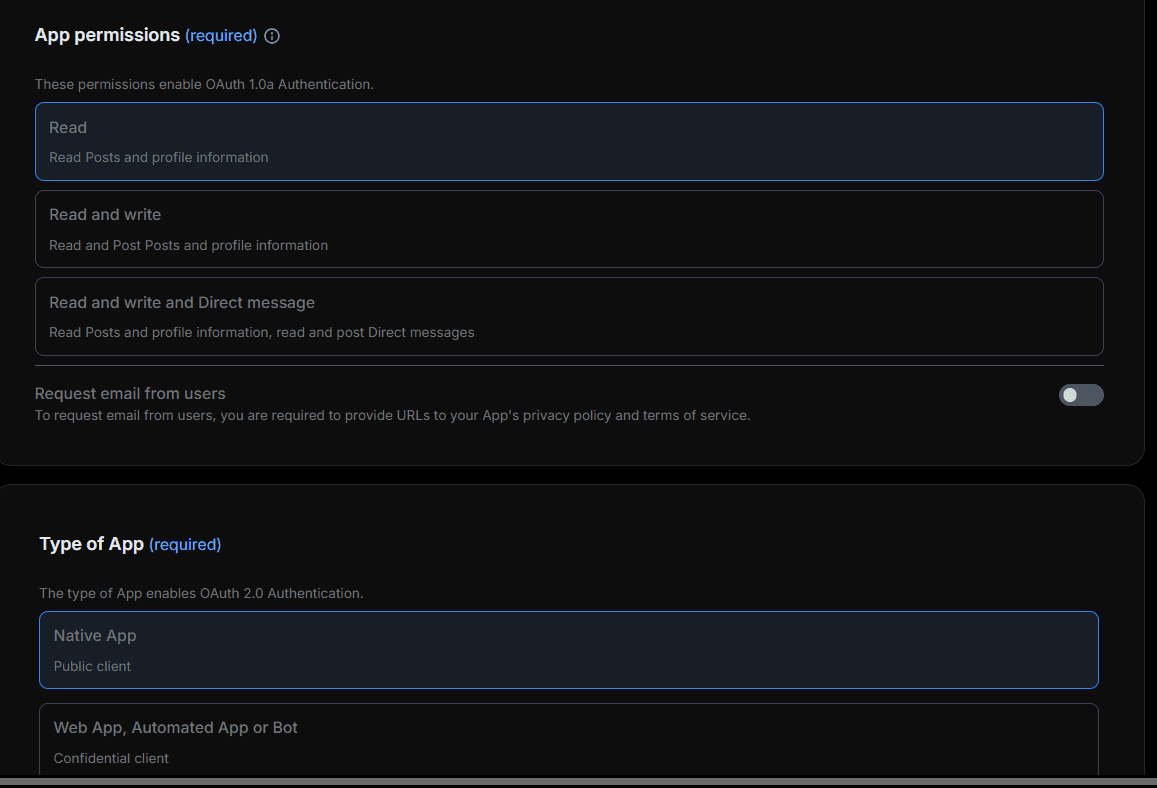
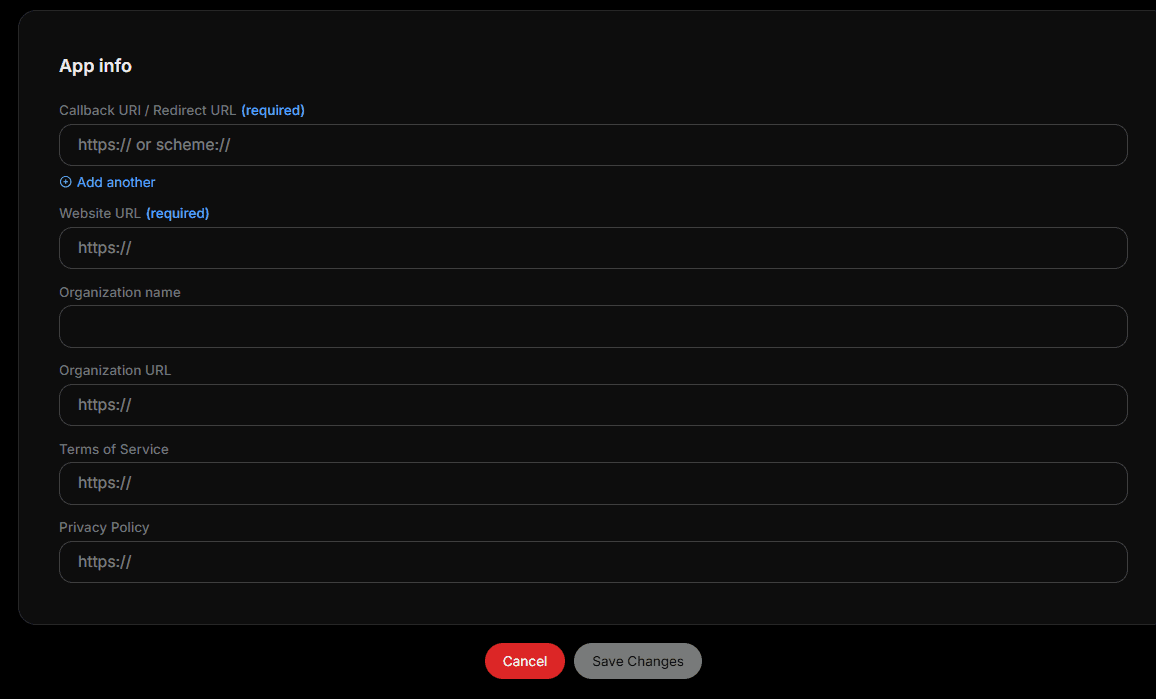
Enter Postly’s callback URL, then use your own website, organization, terms, and privacy-policy URLs for the remaining app fields.
Return to Postly and open the X connection window. Enter the required Client ID, add the Client Secret when your X app uses one, and add a Bearer Token only if you want the optional capabilities that use it.
Explore the complete X guide library
Continue with tutorials covering threads, publishing, automation, analytics, approvals, and campaign workflows.
Current platform capabilities
This list is loaded from Postly's central platform catalog so the website, feature directory, pricing page, and knowledge base stay aligned.
Use these shared creation, scheduling, collaboration, media, and analytics workflows alongside the channel-specific controls below.
Create one-off or recurring schedules, organize work in the content calendar, and publish now or later.
Draft, rewrite, shorten, expand, and adapt platform-specific copy with Postly's AI writing tools.
Use drafts, approvals, notes, publishing presets, and shared workspaces to keep reviews and handoffs clear.
Upload from the media library, preview each channel, and use built-in image and video preparation tools.
Reuse content across selected channels, import bulk posts, and keep campaigns organized from one calendar.
Review publishing results and channel analytics, then use the findings to improve future content.
Platform settings reference
Open Platform settings in the composer to tailor the post for X (Twitter). Available options can depend on the selected account, content type, and API rules set by X (Twitter).
Recommended for most users. Connect through X’s secure authorization screen with no developer API keys. Each $30 monthly stack includes one managed account and 250 weighted publishing credits.
For technical users who manage an X Developer app, API credits, and spending limits. X bills that developer account separately.
X Premium and X developer API billing are separate. An X Premium subscription does not include API credits in either connection mode.
Choose Classic Post, Long-form Post, Thread, or Numbered Thread.
Split long content into replies and attach media to individual thread posts.
Limit who can reply and use community-only options where eligible.
Mark attached media as sensitive when needed.
Add delayed first-comment replies with optional media.
Auto-like your post, repost after a delay and view threshold, or delete after a delay and maximum-view rule.
Open native X Analytics from Postly. Postly does not refresh X analytics when the page opens, avoiding extra API read charges.
Schedule individual X posts and threads. Recurring schedules are not supported for X.
Step-by-step
Open Social Accounts, choose the platform, and complete the platform's authorization flow.
Write a post, generate a draft with AI, reuse a template, or add content in bulk.
Choose the destination, format, audience, engagement, link, and media options available for this channel.
Check the channel preview, resolve media guidance, and send the post through approval when needed.
Publish immediately, choose a date and time, or use a recurring schedule where the platform supports it.
Keep learning
Frequently asked questions
Yes. Create regular or numbered threads and add media to individual replies.
Yes, when the connected X account has the required X Premium eligibility. Otherwise Postly uses classic 288-character posts and automatically converts longer content into a thread.
X-Pro uses Postly-managed developer access and includes a protected monthly publishing allowance. Bring Your Own API Keys uses your X Developer app, and X charges your developer account for its API usage.
No. Postly supports one-off scheduling for X posts and threads, but not recurring X posts.
No. X Premium and X developer API access are separate products. Add and monitor API credits in the X Developer Console for the developer app you connect to Postly.
No. Drafting, editing, rescheduling, changing publishing settings, and cancelling a scheduled post are handled inside Postly and do not call X before publication.
Use the Open X Analytics link in Postly to view analytics on X’s native platform. Opening the Postly analytics page does not query the X API.
Publishing and other explicit X API actions can be metered by X. Each published thread segment is a separate write request, and posts containing links cost substantially more under X pay-per-use pricing.
Edit and reschedule freely, but request analytics or relationship data only when needed, avoid delete-and-republish cycles, limit unnecessary links, and keep threads to the number of segments the content requires.
Yes. X treats each published segment as its own post-creation request, including segments generated from long content when a thread fallback is used.
Connect your account, build the post, review every platform setting, and schedule from one Postly workspace.